How Accurate Is Contract Extraction Software, Really?
23 April 2026 · 5 min read
If you've spent any time with legacy OCR tools, you've earned your scepticism. Fields that randomly shift position break the whole extraction. A slightly rotated scan returns garbage. A supplier changes their invoice layout and suddenly nothing works.
So when someone says "AI contract extraction software is highly accurate," the reasonable response is: prove it.
This post gives you the honest answer — including what accuracy actually means in this context, how confidence scoring works, and how to build a review process that catches the gaps.
"Accurate" is the wrong word to start with
Before we get into numbers, it's worth being precise. Document extraction accuracy isn't a single figure. There are really two things being measured:
- Quality of extracted values — when the AI finds a value, how often is it correct?
- Completeness — across all the fields you care about, how many did it actually find?
A tool can score 98% on quality but only extract 60% of your fields. Or it can be highly complete but return low-confidence guesses on half of them. You need both scores to get the real picture.
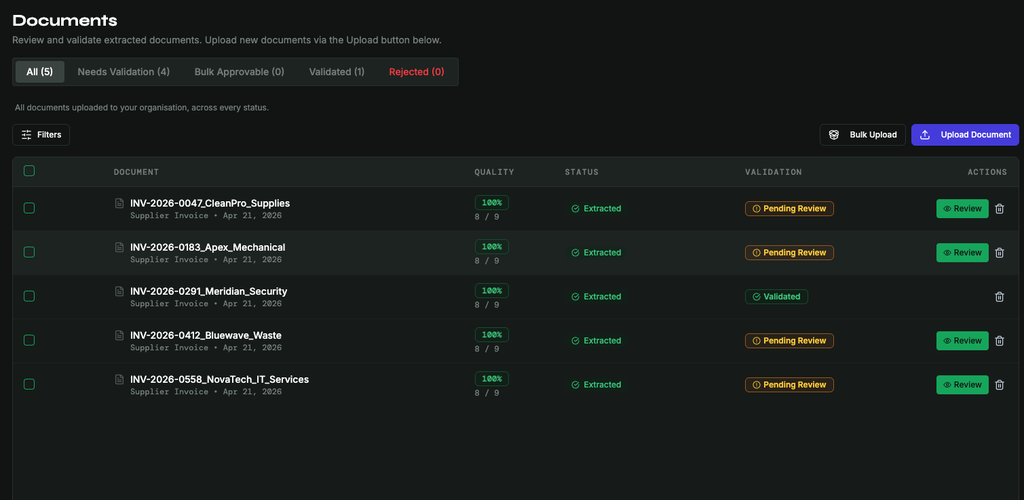
The Nextraxion Documents queue — quality scores and validation status at a glance.
In Nextraxion, these map to two explicit metrics shown on every document:
- Present Field Score — quality of values that were extracted (high-confidence fields ÷ total extracted fields)
- Total Field Score — completeness across all expected fields (extracted fields ÷ total fields defined in your template)
How confidence scoring works
Every extracted field gets a confidence score between 0 and 1. This is the model's own assessment of how certain it is about the value it returned.
| Score | What it means | What Nextraxion shows |
|---|---|---|
| ≥ 0.70 | High confidence — value is reliable | ✅ High |
| 0.40–0.69 | Usable, but worth a quick check | ⚠️ Needs Review |
| 0.20–0.39 | Low confidence — treat as a suggestion | 🔴 Low |
| < 0.20 | Effectively missing | — Missing |
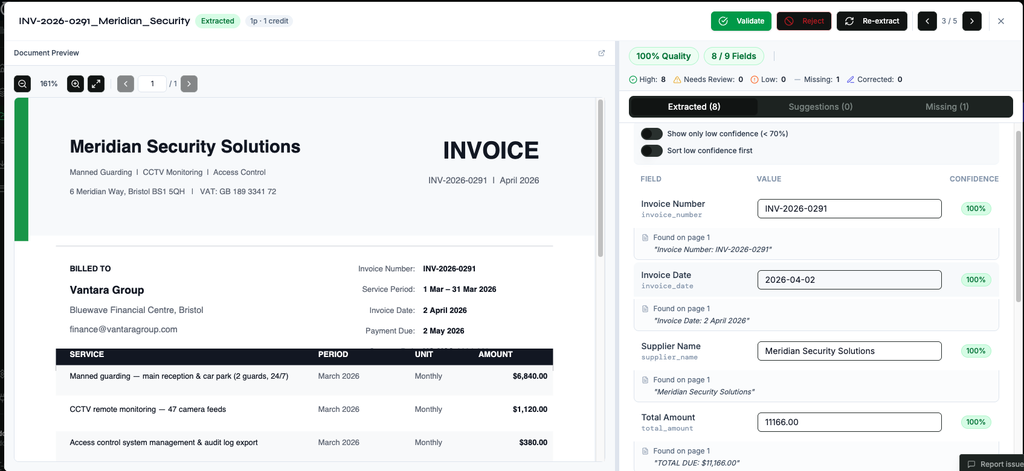
Field-level extraction results — each value shown with its confidence score and source reference from the document.
Fields you've manually corrected are always treated as high quality, regardless of the original score — because a human verified them.
This means when you look at a document in Nextraxion, you're not just seeing extracted values. You're seeing which ones to trust, which ones to glance at, and which ones to fix.
Why AI extraction is different from OCR
Traditional OCR works by converting an image of text into a string. It doesn't understand what "Invoice Date" means — it just knows that some pixels look like the letters I-N-V-O-I-C-E-D-A-T-E and that 18px to the right there's a number.
Move the date field 2cm to the left on the PDF and the whole thing breaks.
This matters particularly for contract extraction, where clause positions, party names, and key dates vary significantly across templates and law firms.
AI extraction understands context. It reads the document the way a person would — looking for meaning, not position. "The date this invoice was raised" is understood as a concept, not a coordinate. This is why it works across suppliers with different layouts, scanned documents with skewed margins, and documents it has never seen before.
It's also why confidence scoring is possible in the first place. The model knows the difference between finding "14 March 2026" right next to a label that says Invoice Date, versus inferring a date from surrounding text because the label was ambiguous. Those deserve different confidence scores, and they get them.
How to set up an effective review queue
Confidence scoring is only useful if you act on it. Here's a practical review process:
For high-volume, routine documents (supplier invoices, delivery notes): Set a threshold. If Present Field Score is above 85% and Total Field Score is above 90%, approve in bulk. Nextraxion's Bulk Approvable queue surfaces documents that meet your quality threshold automatically, so you're not reviewing every single invoice. You can .
For anything with a "Needs Review" flag: These fields have confidence between 0.40 and 0.69. Glance at them — in most cases the value is correct and a single click confirms it. Occasionally you'll catch a transposition or a misread date. Either way, it takes seconds.
For low-confidence and missing fields: These are the ones that actually need attention. Check the source document, correct the value manually, and mark it as validated. Nextraxion tracks every correction — over time, patterns in what gets corrected help you spot document types that need a tighter template definition.
The correction loop: Every time you correct a field, that correction is recorded. This is how you continuously improve extraction quality on the document types you see most often — not by retraining a model yourself, but by building a validated dataset that informs how your templates perform.
What accuracy looks like in practice
On clean, well-structured PDFs — standard supplier invoices, formatted contracts processed through contract extraction software, printed bank statements — you should expect a Present Field Score consistently above 90% and a Total Field Score in the 85–95% range depending on how complete your template is.
On messier documents — scanned forms, low-resolution images, inconsistent layouts — scores will vary more and your review queue will be busier. That's not a failure of the AI. It's the AI being honest about uncertainty rather than guessing and presenting a false 100%.
The comparison isn't "AI vs perfect." It's "AI + light review vs manual data entry." Manual entry has its own error rate — studies consistently put it at 1–4% for trained staff. The difference is that AI extraction with confidence scoring makes errors visible and reviewable. Manual entry doesn't flag the fields a person was unsure about.
The bottom line
AI document data extraction isn't magic, and it isn't fragile OCR with a rebrand. The accuracy you get depends on your document quality, your template definition, and whether you're using the confidence scores to direct your review effort.
The tools that earn trust are the ones that show their working — that tell you "I'm confident about this field" and "you should check this one." That's what confidence scoring is for.
Frequently asked questions
How accurate is AI document extraction?
Typically 90–95% on clearly formatted digital PDFs. Every extracted value comes with a confidence score so you can identify which fields are reliable and which need a check — rather than reviewing everything manually.
What factors affect accuracy?
Document quality (digital vs scanned), document complexity, field type (dates and numbers are more reliable than open-ended clauses), and how clearly your template field descriptions are written.
What happens when a field is extracted incorrectly?
Low-confidence fields are flagged for review rather than silently passed through. You correct the value in the review interface before exporting — it takes seconds.
Is AI extraction more accurate than manual data entry?
In most cases yes, especially at volume. Manual entry produces error rates of 1–4%. AI extraction of well-formatted documents typically comes in below 1–2%. The key difference: AI errors are visible through confidence scores. Manual errors are silent until they cause a problem.
Does it work on scanned or handwritten documents?
Scanned documents can be processed but accuracy is lower. Handwritten text is generally unreliable. Running scanned documents through a PDF optimiser before uploading improves results.
Questions about extraction accuracy or setting up your templates? Email us at hello@nextraxion.com.