- The 9 fields worth extracting from almost every contract type
- Contract-specific fields for NDAs, service agreements, employment, supplier, and lease contracts
- How Nextraxion's template builder handles field selection — including custom fields
- A practical framework for deciding which fields actually matter for your workflow
Most people who start using contract data extraction software ask the same question early on: what should I actually be extracting?
It's a fair question. Contracts contain dozens of data points, but not all of them are worth pulling into a structured format. The useful ones are the fields your team actually needs to track, report on, or act on — not everything on the page.
This guide covers the fields worth extracting from most contracts, plus the more specific fields that matter depending on contract type.
The fields worth extracting from almost every contract
Regardless of contract type, these data points come up most often and have the most downstream value.
The full legal name of each party and their role — client, supplier, service provider, licensor. Useful for filtering your contract database.
When the contract starts. Critical for compliance, renewals, and anything time-bound. Often different from the signature date.
When the contract terminates. The most commonly missed deadline in manual contract management.
The total monetary value of the agreement. Useful for finance teams, budget forecasting, and risk assessment.
How and when payment is due — Net 30, Net 60, milestone-based. Often buried in schedules or annexes.
Does the contract auto-renew, require notice to terminate, or simply expire? Auto-renewal clauses cause a large number of unwanted extensions.
How much advance notice is required to terminate or not renew. Typically 30, 60, or 90 days.
Which jurisdiction's law applies. Important for international contracts and dispute resolution.
Who signed on behalf of each party, and in what capacity. Useful for compliance and audit trails.
Fields specific to certain contract types
Beyond the universal fields, different contract types have their own important data points. Select a contract type below:
How Nextraxion handles field selection
When you create an extraction template in Nextraxion, you don't start from a blank page. The platform suggests the most commonly extracted fields for the document type you're working with — parties, dates, values, payment terms, governing law, and more.
You can accept the suggestions as-is, remove the ones you don't need, and add your own custom fields for anything specific to your contracts.
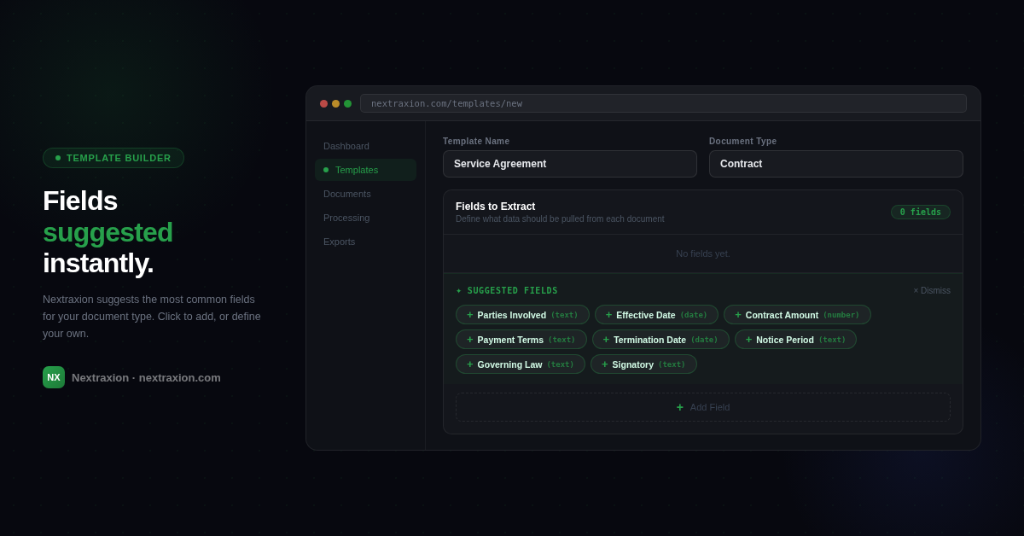
That last part matters. Every business has fields unique to their agreements — internal reference numbers, department codes, client tier classifications, bespoke SLA metrics. Nextraxion lets you define those yourself, in plain English, without any technical configuration.
The result is a template that extracts exactly what your team needs — nothing more, nothing less.
A practical tip before you start
Before building your first template, spend five minutes answering one question:
What would I do with this data once it's extracted? If the answer is "track renewals," you need dates, notice periods, and renewal types. If the answer is "feed it into our CRM," you need party names, contract values, and payment terms. If the answer is "run compliance checks," you need governing law, liability caps, and signatory details. Knowing the output shapes the input.
A template built around a clear use case will perform better and be easier to review than one that extracts everything just in case.
The bottom line
There's no single correct list of fields to extract from a contract. The right fields are the ones your team will actually use. Start with the universal fields — parties, dates, value, payment terms, renewal type, notice period — and add contract-specific fields from there.
If you're not sure where to start, Nextraxion's suggested fields give you a sensible baseline in seconds. From there, your template is yours to build.
Frequently asked questions
Start extracting for free
75 free credits. No credit card required. Live in minutes.
No credit card required