Most contract extraction software is built with enterprise in mind. Large legal ops teams, six-figure contracts, dedicated IT. But the firms that arguably need it most are smaller — practices of two to fifteen people, handling a steady flow of NDAs, service agreements, employment contracts, and client retainers, without a paralegal to manage the data.
This post is for them.
The small law firm contract problem
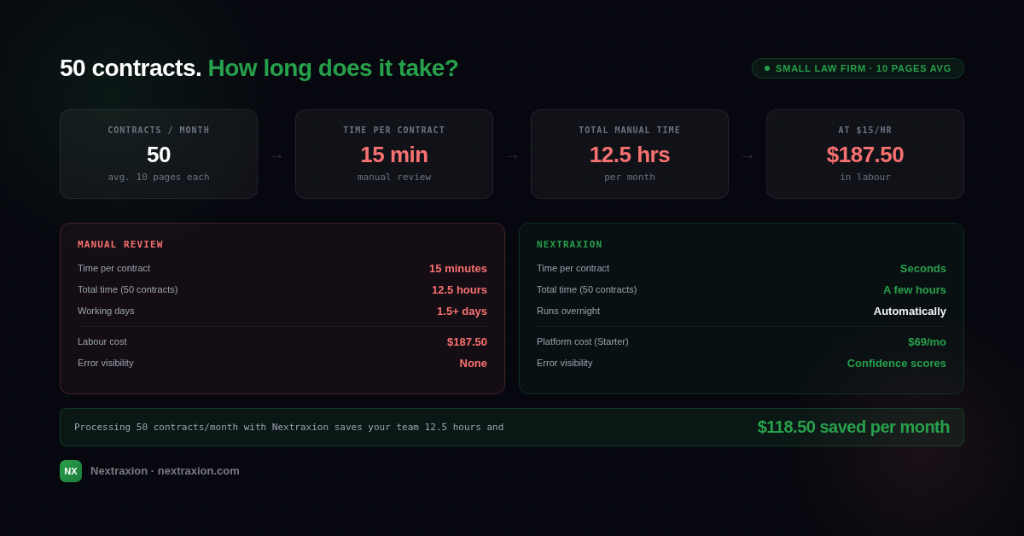
A small firm doesn't process fewer contracts than a large one — in many cases it processes more, relative to headcount. A two-partner practice handling commercial clients might review forty to sixty contracts a month. Each one needs key terms logged: parties, effective dates, notice periods, renewal clauses, liability caps, governing law.
Done manually, that's a significant chunk of billable time spent on administrative data entry rather than legal work. And it introduces risk — missed renewal dates, overlooked notice periods, inconsistent data across matters.
The problem isn't unique to law firms. But the stakes are higher when the data in question is legally binding.
What contract data extraction does for a law firm
Contract data extraction software pulls structured fields from documents automatically. You define what you need — parties, dates, key clauses, monetary values — and the software extracts those fields from every document you upload, returning clean, structured data you can review, export, or feed into your matter management system.
For a small firm, the practical benefits are:
Is it worth the setup time?
For low contract volumes — three or four a month — the time spent building an extraction template may outweigh the time it saves in the short term. But for firms processing contracts consistently, ten or more a month, the economics shift quickly.
A template takes fifteen to thirty minutes to configure. Once built, it extracts data from every subsequent document in seconds, with no additional effort.
What types of contracts work best
Contract extraction performs best on documents that follow a consistent structure. For most law firms, that means:
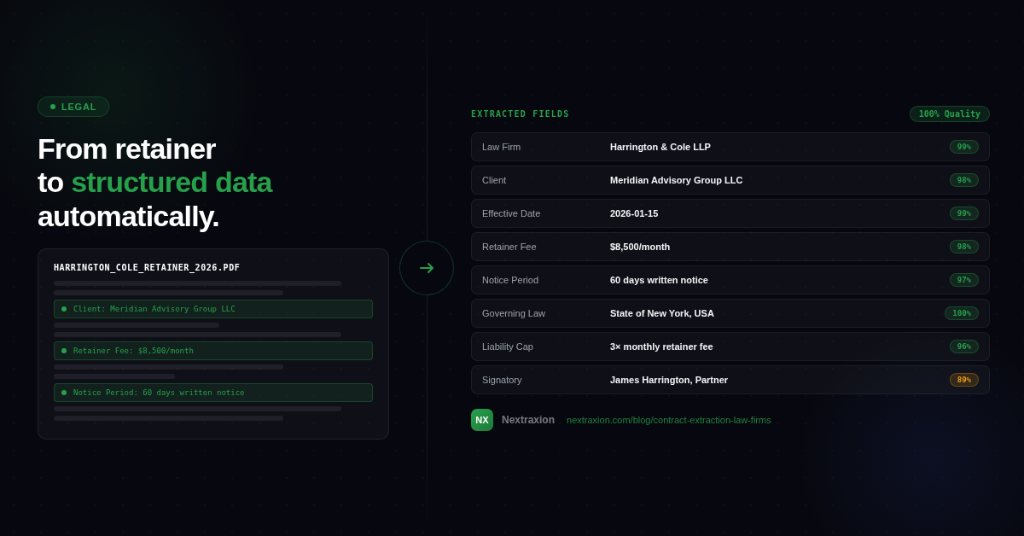
Highly bespoke or heavily negotiated contracts — complex M&A documents, multi-jurisdiction financing agreements — will still require human review of the extracted data. But even there, extraction handles the routine fields and flags the unusual ones, so review is faster and more targeted.
Getting started without a technical team
One of the practical barriers for small firms is the assumption that this kind of software requires IT setup, API integration, or technical configuration. It doesn't.
The Trial plan gives you 75 credits to test it on real documents before committing to anything. No code, no training data, no vendor onboarding process.
The bottom line
Small law firms are well placed to benefit from contract data extraction — high document volume, time pressure, and real consequences for missed data. The barrier to entry is lower than most firms assume, and the cost at volume is a fraction of the manual alternative.
If your team is still logging contract data by hand, it's worth spending 30 minutes finding out what that's actually costing you.
Frequently asked questions
Ready to try it on your contracts?
75 free credits. No credit card, no IT setup, no onboarding call.
No credit card required · Set up in under 30 minutes