Automated Invoice Processing Software
— AI-Powered Data Extraction
Nextraxion is AI-powered invoice data extraction software that pulls structured data from supplier invoices, VAT invoices, pro forma invoices, credit notes and more — with a confidence score and source text on every field. Define your fields once. Works across every invoice format, every time.
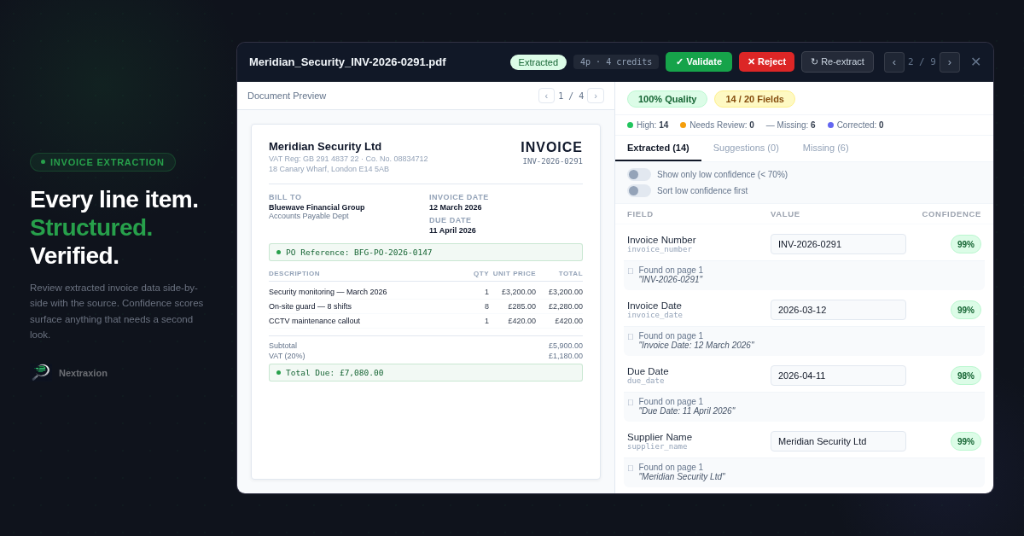
What is invoice data extraction software?
Invoice data extraction is the process of automatically reading supplier invoices — whether PDF, scanned image, or Word document — and pulling out structured fields like invoice number, vendor details, VAT amounts, totals, payment terms and due dates. The extracted data is organised into a consistent format you can export as CSV or JSON, import into your accounting software, or query via the API. Without automation, this process is done manually by accounts payable or finance staff, one invoice at a time.
What is automated invoice processing?
Automated invoice processing is the end-to-end workflow of receiving, reading, extracting and routing invoice data without manual intervention. Nextraxion handles the extraction layer — pulling vendor names, VAT amounts, totals, PO references and payment terms from any invoice format and delivering them as structured, export-ready data. Export as CSV for import into Xero, QuickBooks, Sage or your own systems.
Why it matters for finance teams
Invoice processing is one of the highest-volume manual tasks in any finance function. Keying in vendor names, amounts, and VAT figures from hundreds of invoices per month introduces errors, delays payments, and ties up staff who should be doing higher-value work. Invoice data extraction software eliminates the manual entry step — so invoices move from inbox to accounting system in seconds, not hours.
Why a specialist tool outperforms built-in OCR
Accounting platforms like Xero, QuickBooks, and Sage include basic invoice scanning, but it breaks on unusual layouts and can't be customised for your internal codes. Nextraxion is built exclusively for extraction — which means it handles non-standard formats, supports custom fields like cost centres and PO references, and gives every field a confidence score so your team can catch errors before they reach the ledger.
What invoice data extraction software should capture
Invoice number
Unique invoice ID, PO reference, and supplier document number
Dates
Invoice date, due date, payment date, tax point date
Vendor details
Supplier name, address, VAT number, company registration
Bill-to details
Client name, billing address, contact name, account reference
Custom fields
Cost centre, project code, approver, or any field your team defines
Totals
Subtotal, VAT/tax amount, total due, amount paid, balance
Payment terms
Net days, payment method, bank details, IBAN, sort code
Purchase order
PO number, cost centre, project code, department reference
Works across every invoice format
Standard invoices
Invoice number, supplier, VAT, totals, due date, payment terms
Pro forma invoices
Estimated costs, delivery terms, validity period, advance payment
VAT invoices
VAT registration number, tax point date, VAT rate, VAT amount
Credit notes
Original invoice reference, reason for credit, credit amount, reissue date
Recurring invoices
Billing period, subscription reference, auto-renewal date, frequency
Self-billing invoices
Buyer-generated reference, supplier VAT number, agreed price schedule
Up and running in under 10 minutes
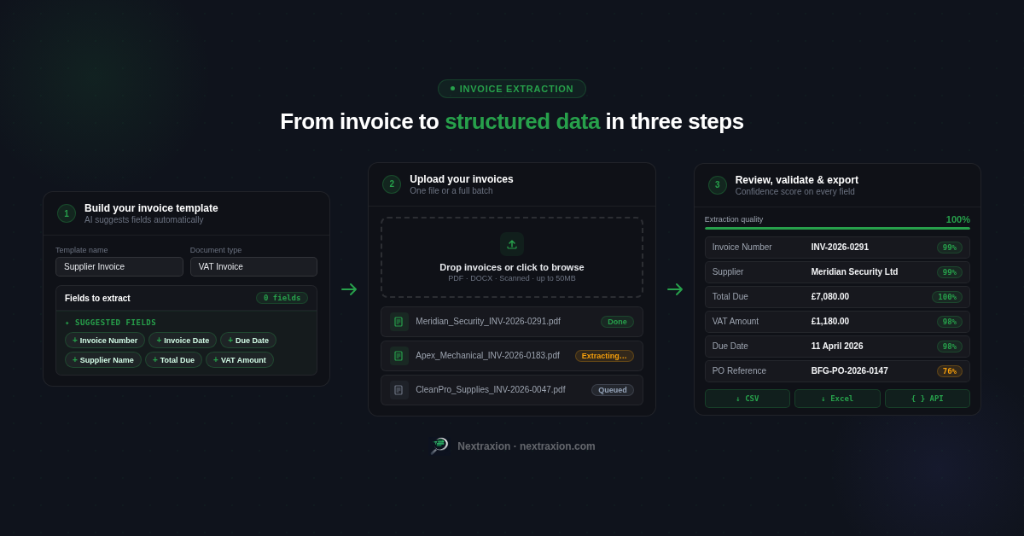
Build your invoice template
Name your template, set the document type to 'Supplier Invoice' or 'VAT Invoice' and AI suggests the most relevant fields instantly. Add custom fields for PO numbers, cost centres or any internal codes.
Upload one or thousands
PDF, Word, or scanned invoices. Upload individually or drop in a whole folder — batch processing handles overnight runs automatically.
Review, validate and export
Every field comes back with a confidence score and the exact source text it came from. Export to CSV or JSON, or connect via API.
Built for every finance role
Accounts Payable
- •Process hundreds of mixed-format supplier invoices without manual data entry
- •Move invoices from inbox to accounting system in seconds, not hours
- •Use Mailhook to receive invoices by email and trigger extraction automatically
Finance Controllers
- •Get accurate, structured invoice data across all vendors in one export
- •Ready for reconciliation, audit, and period-end close
- •Confidence scores flag low-accuracy fields before they reach the ledger
Bookkeepers
- •Handle any client's invoice format without building templates
- •Nextraxion adapts to each supplier's layout automatically
- •Export to CSV or JSON for direct import into any accounting platform
Operations Teams
- •Extract PO numbers, cost centres, and project codes from invoices
- •Keep procurement data aligned with your internal systems
- •Bulk-process supplier invoices overnight with zero manual intervention
How much does manual invoice processing cost?
Manual invoice processing costs £8–£15 per invoice when staff time, error correction, and payment delays are factored in. Automated extraction brings that below £1.
60–80%
reduction in cost per invoice
Automation eliminates data entry time and the rework caused by manual keying errors
< 30s
to extract a complete invoice
From upload to structured export — no manual fields, no re-keying
< 1%
AI error rate vs ~4% manual
Fewer errors mean fewer corrections, fewer payment delays, fewer supplier queries
Example: A finance team processing 500 invoices per month at 10 minutes manual entry each spends over 80 hours on data entry alone — before accounting for corrections. At Nextraxion's Starter plan (£55/month), that same volume is fully extracted automatically, returning those 80 hours to higher-value work.
VAT compliance and HMRC record-keeping
For UK businesses, invoice extraction isn't just about speed — it's about getting the right fields for HMRC. A valid VAT invoice must include the supplier's VAT registration number, the tax point date, and the correct VAT amount at the correct rate. Nextraxion extracts all of these as explicit, labelled fields — giving you a structured record of every VAT invoice aligned with HMRC requirements.
Nextraxion is GDPR compliant, uses encrypted storage, and does not use your documents to train AI models. Your financial documents stay yours.
VAT registration number
Extracted and stored as a labelled field on every VAT invoice
Tax point date
Captured separately from invoice date and due date — as HMRC requires
VAT rate and VAT amount
Extracted from the invoice totals
Supplier name and address
Full supplier details for HMRC record-keeping compliance
GDPR compliant processing
Encrypted storage. No model training on your documents.
Every field
scored for confidence
< 30s
per invoice extracted
60–80%
lower cost per invoice vs manual
Guides and resources
Frequently asked questions
Start extracting data from your invoices today
No finance expertise needed. No IT team. First extraction in under 10 minutes.
Starter from $69/mo · No credit card required
Guides & Resources
How to Extract Data from Contracts Using AI
Manual contract review takes hours. Here's how modern extraction tools pull the data you need — automatically.
What Fields Can You Extract From a Contract?
A practical guide to contract data extraction fields — from parties and dates to payment terms and custom fields.
How Accurate Is AI Document Data Extraction?
The honest answer — including how confidence scoring works and how to build a review process that catches the gaps.
Is It Safe to Upload Confidential Documents?
A plain-English guide to the six things worth checking before you upload a contract, invoice, or NDA to any cloud tool.
CV Data Extraction for HR Teams
How HR teams use automated CV extraction to process high volumes of applications faster, with consistent structured data for every candidate.
Lease Abstraction Software for Property Managers
How property managers use lease abstraction software to automatically extract critical dates, rent reviews, and break clauses from lease agreements.